> ## Documentation Index
> Fetch the complete documentation index at: https://developers.chatwoot.com/llms.txt
> Use this file to discover all available pages before exploring further.
# Caprover Chatwoot Production deployment guide
> Deploy Chatwoot using Caprover's one-click application management
## Caprover Overview
Caprover is an extremely easy to use application server management tool. It is blazing fast and uses Docker under the hood. Chatwoot has been made available as a one-click app in Caprover, and the deployment process is straightforward.
This is a community contributed installation setup. This will only have community support for any issues in future.
## Setup Chatwoot Using Caprover
### 1. Install Caprover on your VM
Finish your Caprover installation by referring to [Getting started guide](https://caprover.com/docs/get-started.html).
### 2. Install Chatwoot
Chatwoot is available in the one-click apps option in Caprover. Search for Chatwoot in the list of one-click apps. Replace the default `version` with the latest `version` of chatwoot. Use appropriate values for the Postgres and Redis passwords and click install. It should only take a few minutes.
### 3. Finish the setup
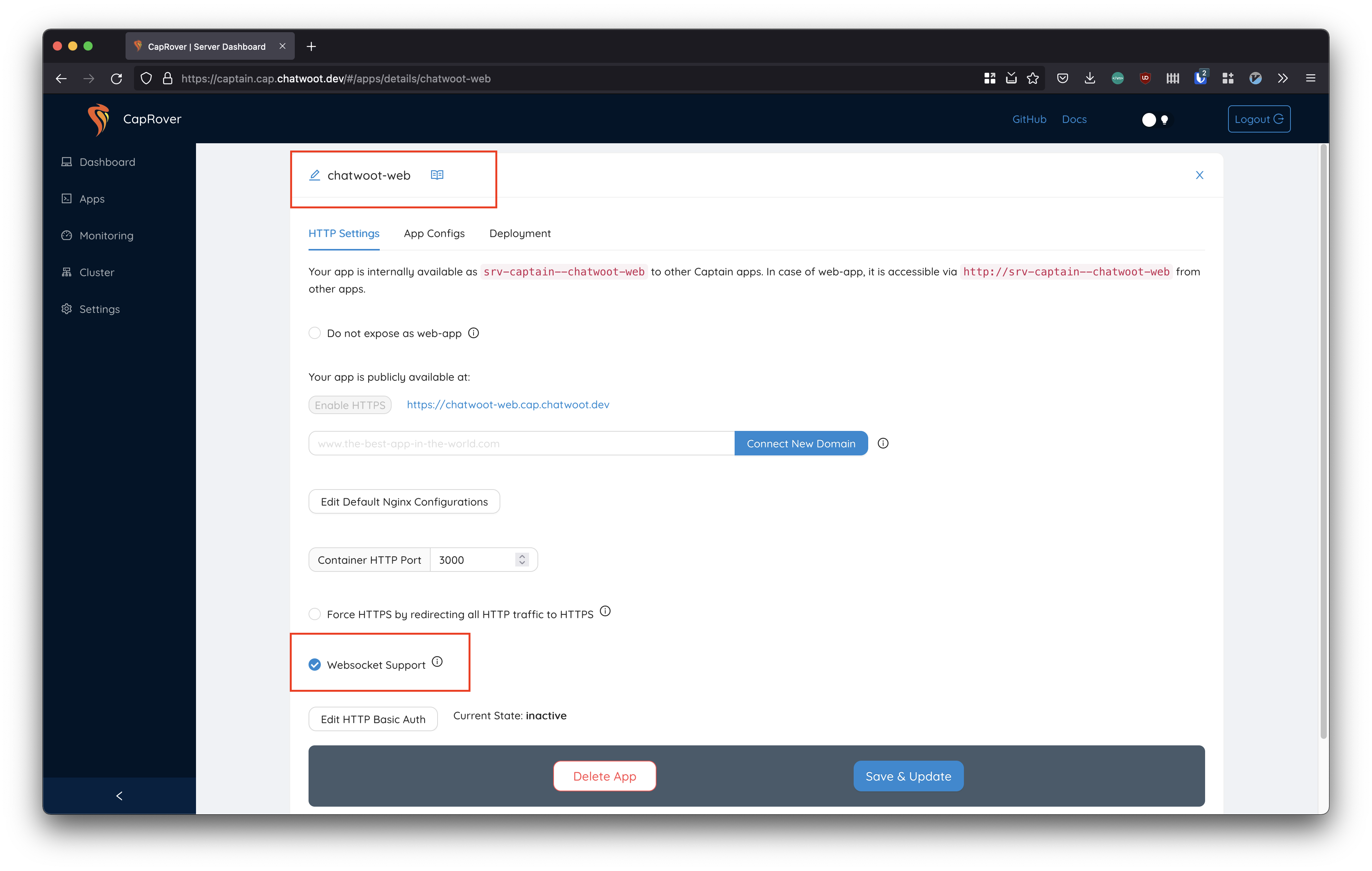
Head over to the `web` service in the Caprover applications and enable `Websocket Support` in the HTTP settings to true. You could also enable `https` for the application.
 ### 4. Configure environment variables
Caprover will take care of Postgres and Redis installation, along with the app and worker servers. We would advise you to replace the Database/Redis services with managed/standalone servers once you start scaling.
Also, ensure to set the appropriate environment variables for email, Object Store service etc. using our [Environment variables guide](/self-hosted/configuration/environment-variables)
Chatwoot requires websocket support. Do enable it from `chatwoot-web` settings page in Caprover.
## Upgrading Chatwoot installation
To update your chatwoot installation to the latest version in Caprover, run the following command in the deployment tab for web and worker in `method 5: deploy captain-definition`. Make sure to replace `[DESIRED VERSION HERE]` with the current latest stable version. Check [here](https://www.chatwoot.com/changelog/) and [here](https://hub.docker.com/r/chatwoot/chatwoot/tags) for possible version numbers first.
### web
```json theme={null}
{
"schemaVersion": 2,
"dockerfileLines": [
"FROM chatwoot/chatwoot:[DESIRED VERSION HERE]",
"RUN chmod +x docker/entrypoints/rails.sh",
"ENTRYPOINT [\"docker/entrypoints/rails.sh\"]",
"CMD bundle exec rake db:chatwoot_prepare; bundle exec rails s -b 0.0.0.0 -p 3000"
]
}
```
### worker
```json theme={null}
{
"schemaVersion": 2,
"dockerfileLines": [
"FROM chatwoot/chatwoot:[DESIRED VERSION HERE]",
"RUN chmod +x docker/entrypoints/rails.sh",
"ENTRYPOINT [\"docker/entrypoints/rails.sh\"]",
"CMD bundle exec sidekiq -C config/sidekiq.yml"
]
}
```
## Accessing Rails Console
Login to the server where you have caprover installed and execute the following commands.
```bash theme={null}
# access the shell inside the container
docker exec -it $(docker ps --filter name=srv-captain--chatwoot-web -q) /bin/sh
# start rails console
RAILS_ENV=production bundle exec rails c
```
## Common Errors
### API requests failing with "You need to sign in or sign up before continuing."
Nginx by default strip of headers with `_` . Head over to the Nginx configuration option in caprover under the Chatwoot web and add the following directive.
Access the Caprover `web dashboard` > `Apps` > `Apps Edit` > `Edit Default Nginx Configurations`. Refer [https://caprover.com/docs/nginx-customization.html](https://caprover.com/docs/nginx-customization.html) for more details.
```nginx theme={null}
# Nginx strips out underscore in headers by default
# Chatwoot relies on underscore in headers for API
# Make sure that the config is set to on.
underscores_in_headers on;
```
### Issues related to storage persistance
Please setup a cloud storage like s3 or gcs bucket or any s3 api compatible service as the active storage service.
Caprover installation needs this for storage persistance. Refer the [storage guide](/self-hosted/deployment/storage/supported-providers).
## Further references
* [https://isotropic.co/how-to-install-chatwoot-to-a-digitalocean-droplet/](https://isotropic.co/how-to-install-chatwoot-to-a-digitalocean-droplet/)
### 4. Configure environment variables
Caprover will take care of Postgres and Redis installation, along with the app and worker servers. We would advise you to replace the Database/Redis services with managed/standalone servers once you start scaling.
Also, ensure to set the appropriate environment variables for email, Object Store service etc. using our [Environment variables guide](/self-hosted/configuration/environment-variables)
Chatwoot requires websocket support. Do enable it from `chatwoot-web` settings page in Caprover.
## Upgrading Chatwoot installation
To update your chatwoot installation to the latest version in Caprover, run the following command in the deployment tab for web and worker in `method 5: deploy captain-definition`. Make sure to replace `[DESIRED VERSION HERE]` with the current latest stable version. Check [here](https://www.chatwoot.com/changelog/) and [here](https://hub.docker.com/r/chatwoot/chatwoot/tags) for possible version numbers first.
### web
```json theme={null}
{
"schemaVersion": 2,
"dockerfileLines": [
"FROM chatwoot/chatwoot:[DESIRED VERSION HERE]",
"RUN chmod +x docker/entrypoints/rails.sh",
"ENTRYPOINT [\"docker/entrypoints/rails.sh\"]",
"CMD bundle exec rake db:chatwoot_prepare; bundle exec rails s -b 0.0.0.0 -p 3000"
]
}
```
### worker
```json theme={null}
{
"schemaVersion": 2,
"dockerfileLines": [
"FROM chatwoot/chatwoot:[DESIRED VERSION HERE]",
"RUN chmod +x docker/entrypoints/rails.sh",
"ENTRYPOINT [\"docker/entrypoints/rails.sh\"]",
"CMD bundle exec sidekiq -C config/sidekiq.yml"
]
}
```
## Accessing Rails Console
Login to the server where you have caprover installed and execute the following commands.
```bash theme={null}
# access the shell inside the container
docker exec -it $(docker ps --filter name=srv-captain--chatwoot-web -q) /bin/sh
# start rails console
RAILS_ENV=production bundle exec rails c
```
## Common Errors
### API requests failing with "You need to sign in or sign up before continuing."
Nginx by default strip of headers with `_` . Head over to the Nginx configuration option in caprover under the Chatwoot web and add the following directive.
Access the Caprover `web dashboard` > `Apps` > `Apps Edit` > `Edit Default Nginx Configurations`. Refer [https://caprover.com/docs/nginx-customization.html](https://caprover.com/docs/nginx-customization.html) for more details.
```nginx theme={null}
# Nginx strips out underscore in headers by default
# Chatwoot relies on underscore in headers for API
# Make sure that the config is set to on.
underscores_in_headers on;
```
### Issues related to storage persistance
Please setup a cloud storage like s3 or gcs bucket or any s3 api compatible service as the active storage service.
Caprover installation needs this for storage persistance. Refer the [storage guide](/self-hosted/deployment/storage/supported-providers).
## Further references
* [https://isotropic.co/how-to-install-chatwoot-to-a-digitalocean-droplet/](https://isotropic.co/how-to-install-chatwoot-to-a-digitalocean-droplet/)